
Media Screens (Recording)
Media screens are PCs with monitors installed in the simulation room that enable the transmission of multimedia content (e.g., X-ray images, blood images, or ultrasound videos) from the control room to the simulation room. This tool panel lets you control the multimedia content played on the media screens.
Provide the media needed for your session to the Simulation Center staff.
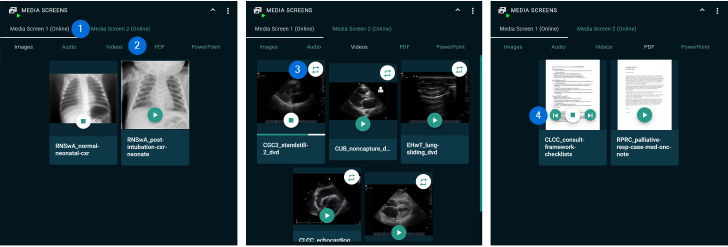
- Available Media Screens
The tabs list all the media screens that are available in the simulation room. - Media Type Section
If more than 8 media files are assigned to a scenario, they will be automatically placed in the appropriate section based on their media type (image, audio, video, PDF, or PowerPoint). - Infinite Loop
Video and audio files have a button in the upper right corner to play the file in an infinite loop. - Scrolling Buttons
PDF and PowerPoint files can be multi-page. There are buttons for scrolling forward and backward.