
Audio of Patient (Recording)
Like Audio to Room, Audio of Patient is an audio channel from the control room to the simulation room. Via this channel, the trainers in the control room can simulate the patient’s voice (tab Control Mic Patient) and play audio files (tab Audio Files) as patient sounds in the simulation room. Both audio sources are played through a loudspeaker near the patient in the simulation room.
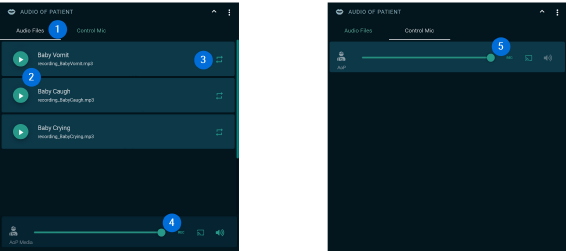
- Audio Files/Control Mic
Switch between uploaded audio files and the control microphone settings in the control room. - Assigned Audio Files
The audio files assigned to the scenario are listed here. - Infinite Loop
Audio files have a button in the upper right corner to play the file in an infinite loop. - Audio Files: Live Settings
- Volume
- Recording (on/off)
- Audio to transmission room (on/off)
- Audio to control room (on/off)
- Control Mic: Live Settings
- Volume
- Recording (on/off)
- Audio to transmission room (on/off)
- Inactive: Audio to control room (on/off)