
Dashboard – Favorites & Calendar
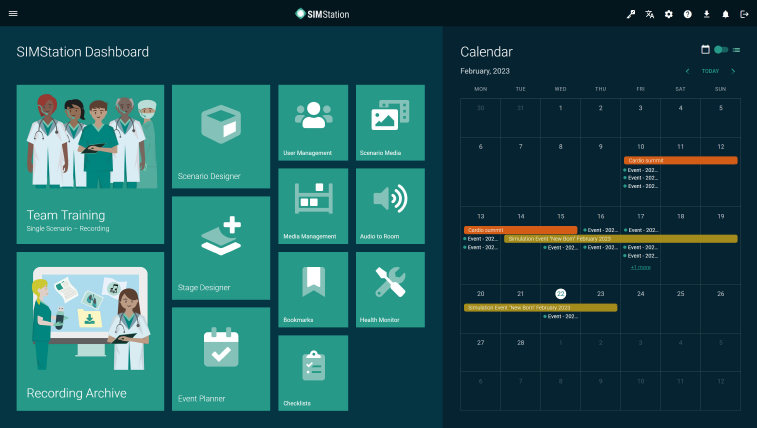
The SIMStation dashboard provides quick access to applications and scheduled sessions.
SIMStation applications are displayed as tiles and can be opened with a single click. The dashboard functions like the favorites screen on a smartphone. You can pin commonly used applications to the dashboard for easy access on that device.
All available applications can also be accessed via the menu icon in the upper-left corner of the screen.
A calendar displaying all scheduled events is shown on the right side of the dashboard. This calendar allows you to quickly locate and select your scheduled simulation sessions.
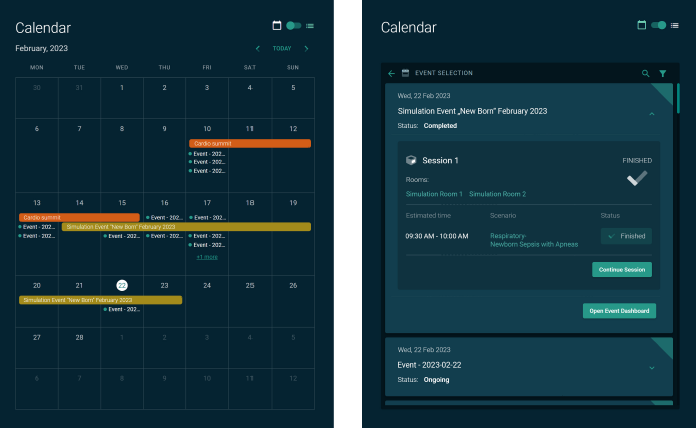
The calendar displays all scheduled simulation events. You can switch between monthly view and list view using the button in the upper-right corner of the calendar.
All events shown in the calendar are created and managed by the Simulation Center staff using the Event Planner application. This includes scheduling sessions, assigning rooms, and coordinating any additional planning elements such as room reservations or supporting documents.
When a simulation session is launched through Team Training, SIMStation automatically generates an event record. Simulation Center staff may extend or modify this event to include additional sessions as needed.
Faculty use the calendar to locate and select their scheduled sessions. The Simulation Center staff will create or manage events.