
Checklists (Recording)
While annotations are a real-time description/commentary of the simulation, checklists are a means of evaluating the simulation. Checklists clarify expectations for trainees – and, of course, require preparation time. As with annotations, checklist entries are also assigned a time code. During debriefing and/or in the archive, checklist entries also serve as bookmarks/jump markers, supporting meaningful navigation through the recording. Please note: In the recording app, this tool panel can only be used during a running recording! After completing a training, the list of your checklist entries is available in the same form for debriefing and in the recording archive.
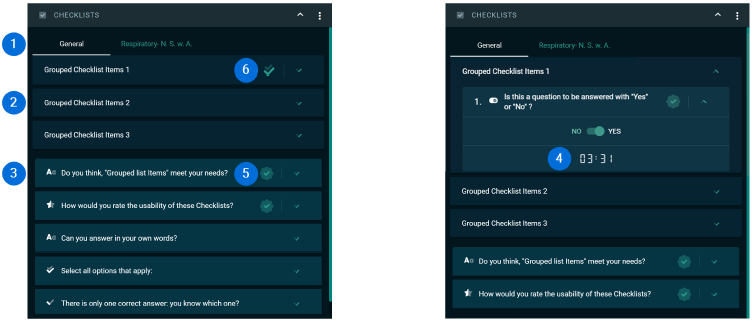
- Checklists
You can integrate multiple checklists into a single scenario. The same checklist can be completed by several trainers simultaneously. This checklist is then stored twice in the recording archive – once for each assigned trainer. - Checklist Groups
You can combine checklist items into groups that, for example, represent the individual phases of your scenario training. - Available Checklist Types: marked with an icon
-
Yes/No

- Star Rating

- Question/Answer (free text input)

- Multiple Choice

- Single Choice

-
- Time Code
When a checklist item is completed, a time-code marker is set. During debriefing and in the recording archive, checklist entries can serve as bookmarks/jump markers to support meaningful navigation through the recording material. - Entry Indicator
When a checklist item is completed, a checkmark icon appears. This improves the overview of which checklist items have already been answered. - Full Group Indicator
When all items in a checklist group are filled, a checkmark icon appears. This improves the overview of which checklist groups have already been completed.


