
Annotations (Recording)
Annotating the events in the simulation room is one of the central tasks of the SIMStation Software. Annotations let you quickly and easily comment on simulation events in real time. Various forms of annotations are available for this purpose. For a better overview, the different annotation forms are marked with easy-to-understand icons. Please note: In the recording app, this tool panel can only be used during a running recording! After completion of a training, the list of your annotation entries is available in the same form for debriefing as well as in the recording archive.
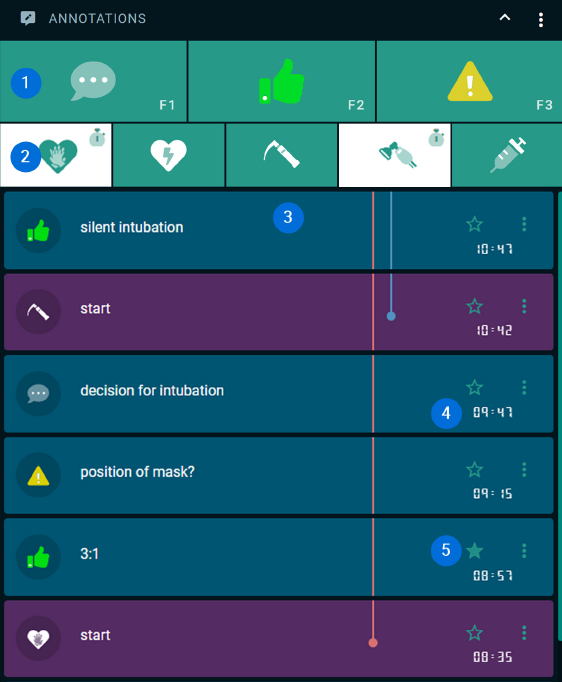
- Standard Icons
The 3 standard icons Comment, Good Action, and Critical Action can also be activated via the Windows function keys F1, F2, and F3. - Customized Icons
Other icons can be configured by the Simulation Lab staff and saved as individual icon sets. Icons with a stopwatch in the upper-right corner are configured to mark a start point (first click) and an end point (second click). The time span in between is marked in the list with a colored line. - Annotation List
If an icon is clicked, a new entry with the respective icon is created in the annotation list below. Each entry can include an additional text comment, which can be changed later by clicking on it. - Time Code
By clicking an icon, each annotation entry is also linked to a time code. During debriefing and in the recording archive, annotations can serve as bookmarks/jump markers to support meaningful navigation through the recording material. - Favorites
With the asterisk above the time code, you mark those annotations that are highly relevant for your debriefing as favorites. You can limit the display of your annotation list in the debriefing to these favorites marked with an asterisk.