
Audience (Recording)
This tool panel can be used to display text formats, such as the clinical vignette, for the audience in the transmission room. The panel includes several text formats specified during scenario creation and cannot be edited, as well as a text editor that allows free-text input during recording.
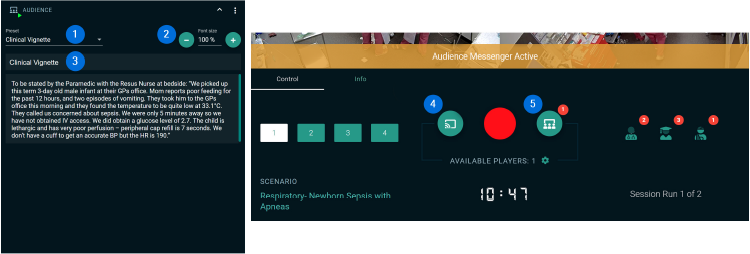
- Text Formats
Four different text formats can be selected via a drop-down menu.- Clinical Vignette
Set during scenario creation. Not editable during recording. - Scenario Description
Set during scenario creation. Not editable during recording. - Case Summary
Set during scenario creation. Not editable during recording. - Free Text
A text editor that allows free typing.
- Clinical Vignette
- Font Size
The font size of the text format displayed on the transmission screen can be enlarged or reduced as desired. - Text Preview
This field displays a preview of the audience text on the control screen. - Video Transmission Control
Activate/deactivate the video transmission manually (in this case, to 1 room). - Audience Transmission Control
Activating this button starts the transmission of the selected text to the audience. In 1-screen mode, the audience text overlays the video streams on the transmission screen (just like the content of the media screen). In 2-screen mode, the transmission is automatically split between both screens: on the left screen, all video streams according to the screen pattern; on the right screen, the audience text.