
Technology in Meeting Spaces
All Meeting Spaces are BYOD
While all Paley meeting spaces are equipped with essential technology for in-person or hybrid meetings, technologyyou must bring your CPH laptop or other mobile device to host meetings.
Meeting Space Types
Technology in some rooms may differ to better accommodate the size of the room.
Types
The Toinstalled simplify,technology meetingis spacesstandardized areby categorizedthe as:types of rooms below:
- One-Person Remote Meeting
SpacesRooms
Starting with the smallest, theThe equipment available in each type of meeting space is outlined below. Please see the locationsLocations at the bottomchapter to help you select the best room for you.
One-Person Remote Meeting Rooms
There are several small rooms located on each floor to accommodate phone calls or online meetings, in which you participate using only your laptop or other mobile device. No technology is installed in the room, and no scheduling is required.
Meeting Spaces with less than 20 seatsRooms
The XX# of Meetings Spaces withrange lessin thansize 20to accommodate 3-12 seats and are equipped with:
|
Wall-mounted Display with Speakers |
|
Camera with Microphone |
|
ScreenBeam Wireless Connection Device: Enables you to connect any iOS or Windows device to the installed Display, Speakers, Camera and Microphone |
|
Wireless Internet Connection |
|
A touch-screen Scheduling |
These smaller rooms are NOT equipped with:
MeetingConference SpacesRooms with (20 or more seatsseats)
The XX# of Meetings Spaces with less than 20 seats are equipped with:
|
Wall-mounted Display with Speakers |
|
Camera with Microphone |
|
ScreenBeam Wireless Connection Device: Enables you to connect any iOS or Windows device to the installed Display, Speakers, Camera and Microphone |
|
Wireless Internet Connection |
|
A touch-screen Scheduling |
|
Computer |
|
|
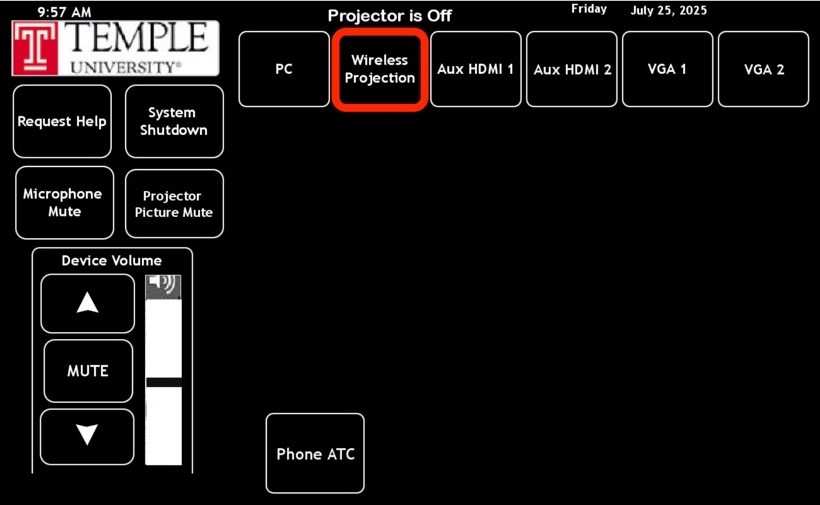
In 20-30 conference rooms, please ensure Wireless Projection is selected on the AMX Panel located within the room.
Scheduling
BothExcept conferencefor roomsthe 46-seat Dean's Conference Room, all Conference and meetingMeeting spacesRooms throughout the building can be scheduled using:by any CPH full-time faculty or staff. One-Person Remote Rooms are not schedulable. Conference and Meeting Rooms can be scheduled using Microsoft Outlook or the wall-mounted Scheduling Panel near the door outside the room.
For more information about scheduling, please refer to the Scheduling chapter.
---------------------------------------------------------------------------------------------------------
- Outlook
- Scheduler Panels (mounted outside each room)
You can schedule any conference room or meeting space on any floor in the building except for the Dean's Conference Room on the fifth floor, which requires approval for scheduling. When you schedule this room via Outlook, a "hold" will be put on the calendar, and a request will be sent to the approvers. You will receive an e-mail when the event has been approved/declined.
Locations
The chart below provides information on all conference rooms and meeting spaces to help assist when booking.
| Floor | Room | Department | Size |
| Fifth | 545A | Dean's Office | 3 |
| Fifth | 500B | Dean's Office | 3 |
| Fifth | 524 | Dean's Office | 3 |
| Mezzanine | M160F | Student Advising | 4 |
| First | 150K | Research Hub | 5 |
|
Ground
|
G50E | Epi Bio Research | 7 |
| Ground | G50F | Epi Bio Research | 7 |
| First | 150A | Research Hub | 7 |
| First | 150C | Research Hub | 7 |
| Second | 200 | Nursing Research | 7 |
| Second | 251B | Sim Center- Admin | 7 |
| Second | 290A | Nursing Research | 7 |
| Third | 304G | CSD Research | 7 |
| Third | 306E | SBS Research | 7 |
| Fourth | 405A | Common Area | 7 |
| Fourth | 405B | HRS Research |
7 |
| First | 140 | Lounge | 11 |
| Second | 270 | Nursing Academic | 11 |
| Third | 306D | SBS Research | 11 |
| Third | 370 | SBS Academic | 11 |
| Fourth | 470 | HRS | 11 |
| Fourth | 405 | Shared | 11 |
| Fifth | 545 | Dean's Office | 11 |
| Ground | G50Z | Epi Bio Research |
12 |
| Mezzanine | M150A | Social Service |
12 |
| Mezzanine | M160B | Student Advising |
12 |
| Second | 290 | Shared |
12 |
| Third | 315 | Shared |
12 |
| Third | 300 |
12 |
|
| Fourth | 415 | Shared |
12 |
| Mezzanine | M140 | Shared |
20 |
| Third | 345 | Shared |
20 |
| Fourth | 445 | Shared |
20 |
| Fifth | 530 | Dean's Office |
20 |
| Third | 340 | Shared | 30 |
| Fourth | 440 | Shared |
30 |
| Fifth | 510 | Dean's Office |
46 |