
About Paley Meeting Spaces
All Meeting Spaces are BYOD
While Paley meeting spaces are equipped with essential technology for in-person or hybrid meetings, you must bring your CPH laptop or other mobile device to host meetings.
Technology by Type
Technology in rooms differs to better accommodate the size of the room. The installed technology is standardized by the types of rooms below:
1. Phone Rooms
There are several small rooms located on each floor to accommodate phone calls or online meetings, in which you participate using only your laptop or other mobile device. No technology is installed in the room, and no scheduling is required.
2. Breakout Rooms (TA meeting rooms)
|
Wall-mounted Display with Speakers |
|
Camera with Microphone |
|
ScreenBeam Wireless Connection Device: Enables you to connect any iOS or Windows device to the installed Display, Speakers, Camera and Microphone |
|
Wireless Internet Connection |
|
A touch-screen Scheduling Panel: Located outside the room to display the room schedule and to schedule meetings. |
3. Meeting Rooms (less than 18 seats)
The XX# Meetings Spaces range in size to accommodate 3-12 seats and are equipped with:
|
Wall-mounted Display with Speakers |
|
Camera with Microphone |
|
ScreenBeam Wireless Connection Device: Enables you to connect any iOS or Windows device to the installed Display, Speakers, Camera and Microphone |
|
Wireless Internet Connection |
|
A touch-screen Scheduling Panel: Located outside the room to display the room schedule and to schedule meetings. |
4. Conference Rooms (18 or more seats)
The XX# of Meetings Spaces with 18 or more seats are equipped with:
|
Wall-mounted Display with Speakers |
|
Camera with Microphone |
|
ScreenBeam Wireless Connection Device: Enables you to connect any iOS or Windows device to the installed Display, Speakers, Camera and Microphone |
|
Wireless Internet Connection |
|
A touch-screen Scheduling Panel: Located outside the room to display the room schedule and to schedule meetings. |
|
Computer |
|
Audio/Visual Control Panel |
Some larger conference room will contain one of the following audio/visual panel types:

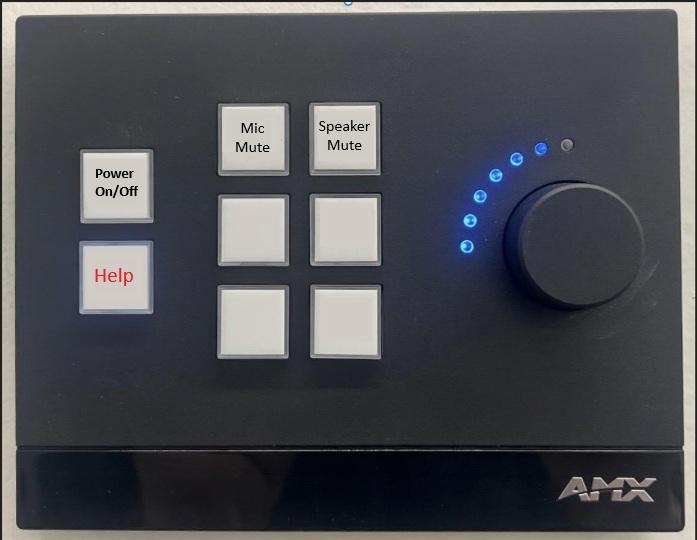
|
Name of the button: |
What it does: |
|
Picture Mute |
Turns off the projector/screen. Audio/microphone will still be usable. |
|
Privacy Mute |
Turns off the camera and overhead microphones. Projector/screen will still be on. |
|
Mic Mute |
Turns off the overhead microphone |
|
Speaker Mute |
Turns off the audio |
|
Wireless Presentation / Other Source |
Switches the display to ScreenBeam for connecting your device for casting/mirroring |
|
Power On/Off |
Turns the TV, microphone, and speakers on and off |
|
Projector Power On/Off |
Turns the projector on and brings down the projector screen from the ceiling / Turns the projector off and brings the projector screen back up into the ceiling |
|
SIM PC |
Switches the display to the simulation PC for displaying SIM center video and connections |
Scheduling
Except for the 46-seat Dean's Office conference room and M140 IMPACT Center conference room, all Conference and Meeting Rooms throughout the building can be scheduled by any CPH full-time faculty or staff. Phone rooms are not schedulable. Conference and Meeting Rooms can be scheduled using Microsoft Outlook or the wall-mounted Scheduling Panel near the door outside the room.
For more information about scheduling, please refer to the Scheduling page.
Locations
See the locations page for more information on floor, room, department, and how many seats are available.