
Technology in Meeting Spaces
While all Paley meeting spaces are equipped with essential technology for hybrid meetings, technology in some rooms may differ to better accommodate the size of the room.
Types
To simplify, meeting spaces are categorized as:
- Meeting Spaces with 20 or more seats
- Meeting Spaces with less than 20 seats
- One-Person Meeting Rooms
Starting with the smallest, the equipment available in each type of meeting space is outlined below. Please see the locations at the bottom to help you select the best room for you.
One-Person Meeting Rooms
There are several small rooms located on each floor to accommodate phone calls or online meetings, in which you participate using only your laptop or other mobile device. No technology is installed in the room, and no scheduling is required.
Meeting Spaces with less than 20 seats
The XX# of Meetings Spaces with less than 20 seats are equipped with:
|
Wall-mounted Display with Speakers |
|
Camera with Microphone |
|
ScreenBeam Wireless Connection Device: Enables you to connect any iOS or Windows device to the installed Display, Speakers, Camera and Microphone |
|
Wireless Internet Connection |
|
A touch-screen Scheduling Panel: Located outside the room to display the room schedule and to schedule meetings |
These smaller rooms are NOT equipped with:
- Computer: You must bring your own laptop or other mobile device.
- Wired Internet Connection: If using the Internet, you must connect via TUwireless.
Meeting Spaces with 20 or more seats
The XX# of Meetings Spaces with less than 20 seats are equipped with:
|
Wall-mounted Display with Speakers |
|
Camera with Microphone |
|
ScreenBeam Wireless Connection Device: Enables you to connect any iOS or Windows device to the installed Display, Speakers, Camera and Microphone |
|
Wireless Internet Connection |
|
A touch-screen Scheduling Panel: Located outside the room to display the room schedule and to schedule meetings. |
|
Computer |
|
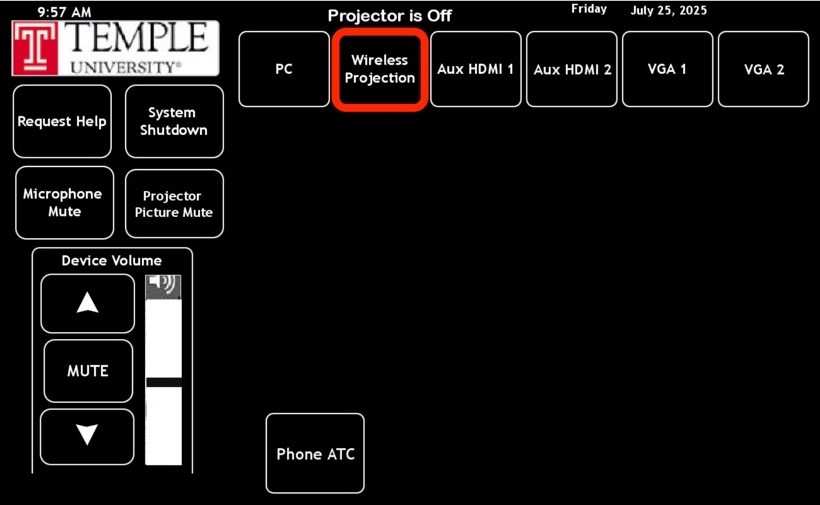
AMX Panel |
In 20-30 conference rooms, please ensure Wireless Projection is selected on the AMX Panel located within the room.
Both conference rooms and meeting spaces can be scheduled using:
- Outlook
- Scheduler Panels (mounted outside each room)
You can schedule any conference room or meeting space on any floor in the building except for the Dean's Conference Room on the fifth floor, which requires approval for scheduling. When you schedule this room via Outlook, a "hold" will be put on the calendar, and a request will be sent to the approvers. You will receive an e-mail when the event has been approved/declined.
Locations
The chart below provides information on all conference rooms and meeting spaces to help assist when booking.
| Floor | Room | Department | Size |
| Fifth |
545A | Dean's Office | 3 |
| Fifth |
500B | Dean's Office | 3 |
| Fifth |
524 | Dean's Office | 3 |
| Mezzanine |
M160F | Student Advising | 4 |
| First |
150K | Research Hub | 5 |
|
Ground
|
G50E | Epi Bio Research | 7 |
| Ground |
G50F | Epi Bio Research | 7 |
7
First 140 Lounge 11 Second 270 Nursing Academic 11 Third 306D SBS Research 11 Third 370 SBS Academic 11 Fourth 470 HRS 11 Fourth 405 Shared 11 Fifth 545 Dean's Office 11 Ground G50Z Epi Bio Research12
Mezzanine M150A Social Service12
Mezzanine M160B Student Advising12
Second 290 Shared12
Third 315 Shared12
Third 30012
Fourth 415 Shared12
Mezzanine M140 Shared20
Third 345 Shared20
Fourth 445 Shared20
Fifth 530 Dean's Office20
Third 340 Shared 30 Fourth 440 Shared30
Fifth 510 Dean's Office46