
Voicemail
Access Your Voicemail Information Menu
From
- Open
phone:Teams. - Click on the
VoiceCallsMailicon. - Dial
or*62dialand*62.call. Then enter your passcode followed by the # key.
From another phone: Dial 1-9599 (on-campus) or 215-204-9599 (off-campus).
Then follow the prompts to enter your mailbox ID (your internal five-digit phone number) followed by
the # key and passcode followed by the # key.
Create a Personal Greeting
1.
- Open Teams.
- Click on the
VoiceCallsMailicon. - Dial *62 and call. Then enter your passcode followed by the # key.
- Press 1 and perform one or more of the following:
.- Press 2 to create a busy greeting for when you are on the phone.
- Press 3 to create a no answer greeting when you are away from your desk.
.
2.
Retrieve Your Messages
FromVoicemails are automatically sent to your phoneTemple email.
Reset/Update Your Voicemail Password
Your voice mailbox is automatically locked after five invalid login attempts. If you have trouble resetting your passcode, or simply have a question, please contact Telecommunications at 215-777-VOIP or via email at telecom@temple.edu.
| 1. |
|
| 2. Click on the home tab. | |
| 3. Under TUApplications, click Telecom Self Service. |
|
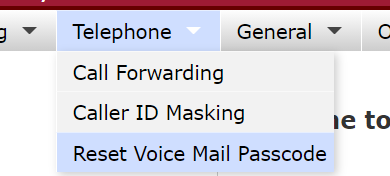
| 4. Hover over the Telephone tab, and click Reset Voicemail Password. |
|
| 5. Click the checkboxes to confirm that you agree. | |
| 6. Click Click here to Reset Voice Mail
|
|


key and passcode followed by the # key.
3.Press 1.
4.Press 1.
Extended absence greeting for my office (VoIP)
If you will be on vacation or out of the office, you can record an extended absence greeting on your
voicemail. To do so: PressOpen theTeams Voiceand Mailcall keyinto oryour dialvoicemail. 1-9599(on-campus) or 215-204-9599(off-campus).
Then enter your passcode followed by the # key. Press 1 to access your voice mailbox. Press 6 to change
your mailbox extended away greeting. Press 3 and follow the prompts to record and activate a new
greeting. When you return to the office, you can remove the extended absence greeting by following
steps 1 through 3 above. When prompted after step 3, press 2 to deactivate your extended absence greeting.
greeting